


Description
THE PROGRAM CONSISTS OF:
GargoyleSiteMapper0.1.5.py
SOFTWARE PURPOSE:
Generate a sitemap.xml for your website with webpage and image end-points in order to enable Search Engine crawlers to find and map all your webpages.
SOFTWARE INTERFACE:
Graphical User Interface
SOFTWARE REQUIREMENTS – ADDITIONAL INSTALLATIONS (ALL OPEN-SOURCE):
python 3.6+ (This program was extensively tested on Python 3.12.3)
lxml==6.0.2 (pip install lxml)
SOFTWARE REQUIREMENTS – ALREADY INCLUDED IN YOUR PYTHON 3.12.x INSTALLATION:
SYSTEM & OS: sys, os, time, datetime, random
NETWORKING: ssl, urllib, request, urllib.parse, urllib.robotparser, queue, threading
GUI: tkinter
DATA HANDLING: email.utils
– Memory (RAM): Minimum 2GB. The program is very light, but if you crawl a site with 10,000+ pages, the URL queue will sit in your RAM.
– Internet Connection: A stable connection is required. If your internet drops, the “Timeout” safety feature will trigger, and the crawler will mark those pages as an “Error.”
– The software needs Write Permissions in the folder where the script is located. It creates a new directory for every domain it crawls. It saves .xml and .txt files inside those directories. Ensure you are not running the script from a “Read-Only” location like a protected System32 folder or a locked USB drive.
SOFTWARE DESCRIPTION:
The Gargoyle Sitemap Generator v0.1.5 is a professional-grade web crawler designed to map the architecture of a website while prioritizing stealth, ethics, and diagnostic accuracy. It acts as an automated explorer that “reads” a website like a human would, but at the speed of multiple concurrent threads.
Here is a breakdown of how the program operates and the specific safety layers I have engineered into it’s architecture.
1. Functional Overview
The program starts at a “Seed URL” and parses the HTML to find every internal link. It follows these links recursively, building a tree-like map of the entire domain.
Engine: A multi-threaded orchestrator that manages a “Queue” (to-do list) and a “Checked” dictionary (history).
Output: It produces a standard sitemap.xml for SEO and a broken_links.txt for site maintenance.
2. Multi-Layered Safety Features
To ensure the program is a “Good Actor” on the web and doesn’t get your IP address banned or crash your server, it uses several safety protocols:
A. The “Good Citizen” Protocol (Robots.txt)
Before the first link is even crawled, the program fetches the site’s robots.txt file. It uses the RobotFileParser to ensure it never enters “Disallowed” directories. If a site owner has marked a folder as private, Gargoyle will skip it automatically.
B. Human-Mimicry (Rate Limiting)
Standard bots hit a server thousands of times a second, which looks like a DDoS attack. Gargoyle uses Randomized Pauses (min_p and max_p). After every page visit, each thread sleeps for a random interval. This makes the traffic look like a natural human browsing patterns rather than a machine.
C. Domain Locking (The “Fence”)
To prevent the crawler from accidentally trying to “map the entire internet,” it uses strict Netloc Validation. If it finds a link to Facebook, Twitter, or an external blog, it recognizes that the “Network Location” doesn’t match your target domain and refuses to follow it.
D. Keyword & Backend Filtering
The program includes a “Blacklist” of keywords (e.g., /admin, wp-login, ?). This prevents the crawler from getting stuck in “Spider Traps” (infinite loops caused by calendar filters) or attempting to access sensitive login portals.
E. Thread-Safe “Locking”
When multiple threads try to write to the same list at once, “Race Conditions” can occur, leading to data corruption. Gargoyle uses a Global Interpreter Lock (GIL) mechanism via threading.Lock(). This ensures that only one thread can update the “Checked” list at a time, keeping your “Genesis Document” data 100% accurate.
F. The “Traffic Light” (Pause/Resume/Stop)
Unlike simpler scripts that you have to “kill” (potentially losing data), Gargoyle uses Condition Variables.
Pause: Gently tells threads to finish their current task and wait without consuming CPU.
Stop: Triggers an immediate “Safe Exit” that stops the engine and saves everything found up to that millisecond.
3. Diagnostic Safety (Broken Link Detection)
The program treats errors (404, 403, 500) as valuable data rather than failures. By tracking the Referrer, it ensures that even if a page is “broken,” you know exactly which healthy page contains the bad link. This allows you to repair the site without manual searching.
TECHNICAL SPECIFICATIONS & USER MANUAL:
1. Core Architecture
Gargoyle is built on a Non-Blocking Multithreaded Orchestrator. It utilizes a “Producer-Consumer” model where the main engine manages a centralized queue of URLs, and worker threads consume those URLs to perform HTTP requests and HTML parsing.
Concurrency Model: threading.
Thread with a threading.Condition synchronization primitive.
Parsing Engine: lxml for high-performance XPath-based link extraction.
Networking: urllib.request with custom User-Agent rotation headers.
2. Safety & Ethics Protocol (The “Politeness” Engine)
The program is engineered to adhere to the Web Robot Standards.
| Feature | Technical Implementation | Purpose |
|---|---|---|
| Robots.txt | urllib.robotparser | Prevents crawling of private or sensitive server directories. |
| Rate Limiting | random.uniform() | Prevents server strain by injecting human-like delays. |
| Domain Lock | urlparse().netloc | Ensures the bot never wanders onto third-party websites. |
| Keyword Filter | exclude_keywords list | Skips “Spider Traps” and administrative login portals. |
3. User Manual
A. Setting Up the Crawl
1. Target URL: Enter the full domain (e.g., https://example.com).
2. Threads: Recommended 4–6 for standard shared hosting; 8–10 for dedicated servers.
3. Timeout: Set to minimum of 20s. This prevents the program from hanging on slow, unresponsive pages.
4. Pauses: Set Min Pause to 0.5 and Max Pause to 3.0 to maintain a steady, non-aggressive flow.
B. Managing the Session
Pause/Resume: Use this if you notice your internet connection is lagging or if you need to temporarily free up system resources. Worker threads will complete their current page and “sleep” until resumed.
Stop: This is the “Graceful Exit.” It tells the engine to cease all operations and immediately compile the sitemap.xml and broken_links.txt using only the data collected so far.
C. Understanding the Output
Every crawl creates a folder named after the domain (e.g., mysite_co_za). Inside, you will find:
Sitemap (XML): Upload this to your root directory and submit it to Google Search Console.
Repair Report (TXT): Open this to see a list of broken links. It identifies the Source Page, making it easy for you to log into your CMS and fix the typo.
4. Safety Warnings
Note: While Gargoyle is designed to be safe, running too many threads (20+) with zero pauses may cause some firewalls (like Cloudflare) to temporarily block your IP address. Always start with the default settings.
INSTALLATION:
We highly recommend creating a virtual envelope using: python -m venv <env_name>. The envelope can be activated with from within the venv folder you just created using source ./bin/activate
Some variants of linux will require you to install venv using sudo apt install python3-venv
– Graphical User Interface (Tkinter) allows all settings and URL to be changed inside the program
– Set script to executable: `sudo chmod +x GargoyleSiteMapper0.1.5.py`.
– Running the script: `python3 GargoyleSiteMapper0.1.5.py` or `python GargoyleSiteMapper2.0.py` depending on how your system is configured.
EXAMPLE SCREENSHOTS:
Simplified design. A single screen where you enter the URL to be crawled. Please take care not to change the settings for the minimum and maximum wait period, timeout or threads unless you are sure. These variables was designed to protect you from being marked by your server as a potential DDOS attacker. If you have high simultaneous threads your server will be overrun with requests. If you set the random timeout too low, you bypass the purpose of the program to request your website mapping whilst appearing like request from a human.
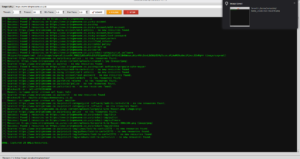
Gargoyle Site Mapper Screen Shot
Output will be created as sitemap.xml with a date and timestamp in front of the file name and stored in a subfolder named after the website you crawled. The date and timestamp was added to allow you to compare two sitemaps to ensure that new pages was fully mapped.
You will notice email addresses and phone numbers will not be mapped. To do this would open you up to unsolicited marketing.
Before uploading the file to your webserver, remove the date and timestamp so the filename is only ‘sitemap.xml’.
Please take note, this program was designed for you to map your own website, for better search engines exposure, and not as a hacking tool. Please use the program for the purpose intended.
EXAMPLE OUTPUT:
</url>
<url>
<loc>data:image/svg+xml;base64,PHN2ZyB3aWR0aD0iMSIgaGVpZ2h0PSIxIiB4bWxucz0iaHR0cDovL3d3dy53My5vcmcvMjAwMC9zdmciPjwvc3ZnPg==</loc>
</url>
<url>
<loc>https://www.bringmesome.co.za/privacy-policy</loc>
</url>
<url>
<loc>https://www.bringmesome.co.za/wp-content/uploads/unnamed-1.jpg</loc>
</url>
<url>
<loc>https://www.bringmesome.co.za/shop/cat_software/gargoyle-site-mapper</loc>
</url>
<url>
<loc>https://www.bringmesome.co.za/shop/?add-to-cart=15778</loc>
</url>
<url>
<loc>https://www.bringmesome.co.za/product-category/cat_software/?add-to-cart=15778</loc>
</url>
<url>
<loc>https://www.bringmesome.co.za/wp-content/uploads/Gargoyle-Site-Mapper.png</loc>
</url>
<url>
<loc>https://www.bringmesome.co.za/product-tag/linux</loc>
</url>
<url>
<loc>https://www.bringmesome.co.za/product-tag/python</loc>
</url>
<url>
<loc>https://www.bringmesome.co.za/product-tag/software</loc>
</url>
<url>
<loc>https://www.bringmesome.co.za/product-tag/windows</loc>
</url>
<url>
<loc>https://www.bringmesome.co.za/wp-content/uploads/Gargoyle-Site-Mapper-300×164.png</loc>
</url>
<url>
<loc>https://www.bringmesome.co.za/product-tag/python/?add-to-cart=15778</loc>
</url>
<url>
<loc>https://www.bringmesome.co.za/product-tag/linux/?add-to-cart=15778</loc>
</url>
<url>
<loc>https://www.bringmesome.co.za/product-tag/software/?add-to-cart=15778</loc>
</url>
<url>
<loc>https://www.bringmesome.co.za/product-tag/windows/?add-to-cart=15778</loc>
</url>
</urlset>
GUARANTEES & WARRANTIES:
The only guarantee offered is that the program will run as intended, if installed as instructed, within the operating systems as specified, at the point when we offer it for sale.
We are not responsible for it not running on future operating system versions or types, or for future changes in technology that may makes this program obsolete.
No guarantee of suitability for a specific purpose is offered other than what is specified in line 1 of this section.
Software downloaded is not refundable, our description is clear as to what the program can, and cannot do. If you expected more, you did not read the information properly, and we take no responsibility for that. Once you download the program, you become privy to our code, and gained the knowledge of how it works and cannot ask for a refund.
We retain code for a 1 year period on our website, during which you can download it as many times as you wish (provided you bought and paid for it). Please make sure you make your own backup, because after a year, your code may (or may not reside on our website any longer) and you will have no claim against us for replacement or refund if you did not make your own backup copy.
Of course we always try to assist our customers, but if there are costs involved to resupply an older version of a program which you did not backup, after the 1 year period, the cost will be for your account.
Reviews
There are no reviews yet.